November 22, 2021, 4 min read, by Vinicius Bastos
Zigbee and Wi-Fi Coexistence in the Smart Home
Zigbee and Wi-Fi share the 2.4 GHz band. See how to plan Wi-Fi and Zigbee channels to reduce interference in your smart home.

With new Zigbee products arriving, it's important to understand how the protocol coexists with Wi-Fi in the smart home.
Both protocols use the 2.4 GHz band, which can cause interference and signal attenuation.
In this post, we'll look at how to design a network so that Wi-Fi and Zigbee coexist peacefully.
Zigbee and Wi-Fi channels
At first glance, Zigbee and Wi-Fi channels may seem distinct, suggesting that they don't overlap. Unfortunately, that's not the case.


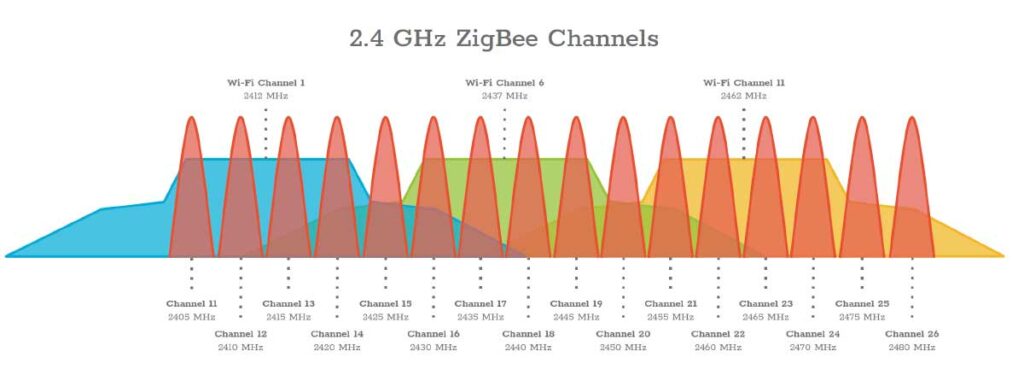
The three non-overlapping Wi-Fi channels (1, 6, and 11) occupy the same frequencies as Zigbee channels 11 to 25, counting the sideband of Wi-Fi channel 11, which reaches channel 25. Only Zigbee channels 15 and 20 fall in the gaps between them, and even so they're within reach of the sidebands, which we'll look at later.
Zigbee channel 26 is usually not affected by Wi-Fi, but many Zigbee devices don't support it.
Interference
When a Wi-Fi network is on the same channel as a Zigbee network, the Wi-Fi network usually interferes with the Zigbee network.
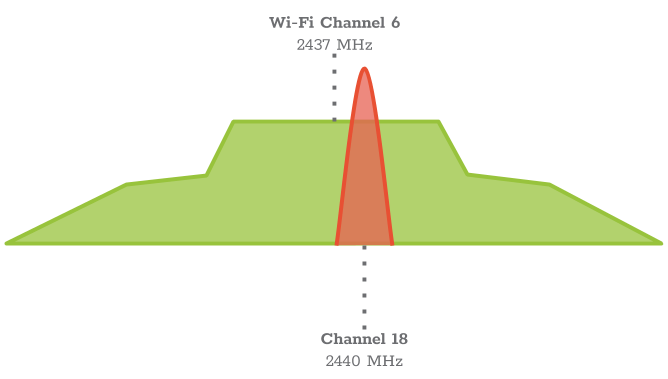
Sideband interference
The spectrum of an 802.11g/n network has two components: the 20 MHz "square" section, which carries the data, and the sidebands, which are a normal side effect of transmission.
The sideband may not carry Wi-Fi data, but it can drown out the Zigbee transmission.
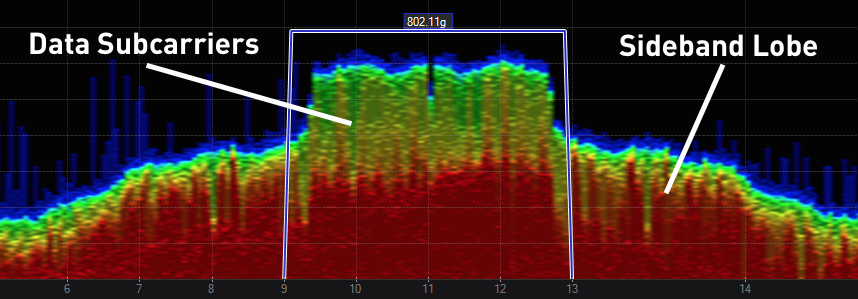
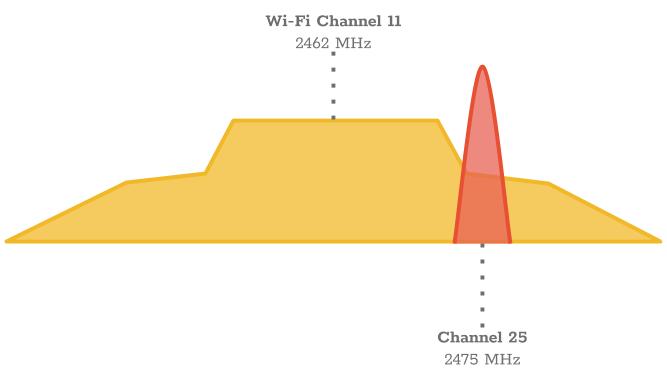
The sideband is usually only noticeable when you're very close to the transmitting device.
This happens when the Zigbee device and the Wi-Fi access point are very close to each other, such as in the same cabinet or rack.
Channel planning
The secret to peaceful coexistence between Wi-Fi and Zigbee is channel planning.
Normally, we use three Wi-Fi channels (1, 6, and 11), which are the channels that don't overlap and maximize Wi-Fi coverage throughout the house.
However, to use Zigbee, we'll stop using channel 11.

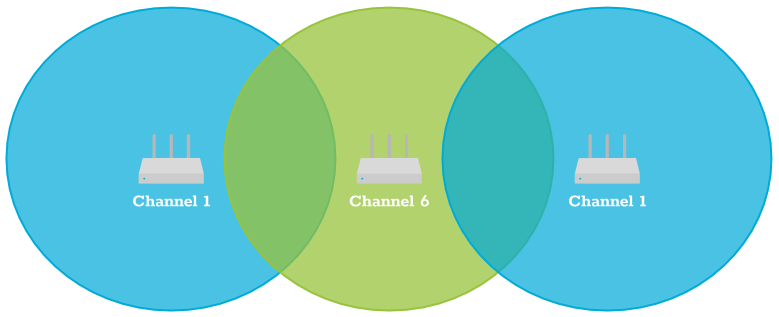
When we install Wi-Fi APs around the house, the idea is to keep neighboring APs on different channels so that they don't interfere with each other.
Without channel 11, you'll have to repeat channel 1 or 6 at the ends. Although it's not ideal, this strategy makes room to deploy the Zigbee network efficiently in the house.
Zigbee channels
Without channel 11 on your 2.4 GHz Wi-Fi network, set up the Zigbee network on channel 21 or higher. The channel is chosen on the hub (the network coordinator), and Zigbee devices follow its channel. This strategy is the secret to maximizing the range of the Zigbee network while coexisting with Wi-Fi.
What about Thread?
The same planning applies to Thread, the radio protocol used by many Matter devices. Like Zigbee, it's based on the IEEE 802.15.4 standard and uses the same channels, 11 to 26. If the house has a Zigbee network and a Thread network, put them on different channels, both away from the channels used by Wi-Fi.
Watch out for the neighbors
Even if you do everything right inside your home, it's quite possible that your neighbors' networks will interfere with yours. This happens mainly in apartments, where there are many APs around.
To minimize this problem, use the WiFiman app (available for Android) and check which 2.4 GHz channels the neighboring networks with the strongest signal are on.
Note a detail specific to Brazil: here, routers can also use Wi-Fi channels 12 and 13 (in the United States, they only go up to 11). A network on these channels occupies the frequencies of Zigbee channels 22 to 26, so check whether any neighbor is using them before choosing your Zigbee network's channel.
With this in mind, use the same strategy to adjust your APs and reduce signal interference. And, whenever possible, connect the devices that support the 5 GHz band, such as phones, laptops, and TVs, to that band: this leaves less traffic on the 2.4 GHz band, which is the one automation uses.
Conclusion
Designing, installing, and configuring a Wi-Fi network may seem simple, but it requires networking knowledge, specialized apps, and an understanding of the equipment so that, in practice, everything works well. If you're still deciding between the two protocols, see Wi-Fi or Zigbee? What are the main differences?
Source: MetaGeek (now part of Oscium), ZigBee and Wi-Fi Coexistence.